Applies To: ■ New PoliteMail ■ Legacy PoliteMail
Version: ■ 4.9+ ■ 5.0+
Outlook Message Preview
Preheader text is the text that appears under the Subject line in the Outlook Preview pane. It's the first few lines of the body of your email, but it can also be security notifications such as External Sender alerts.
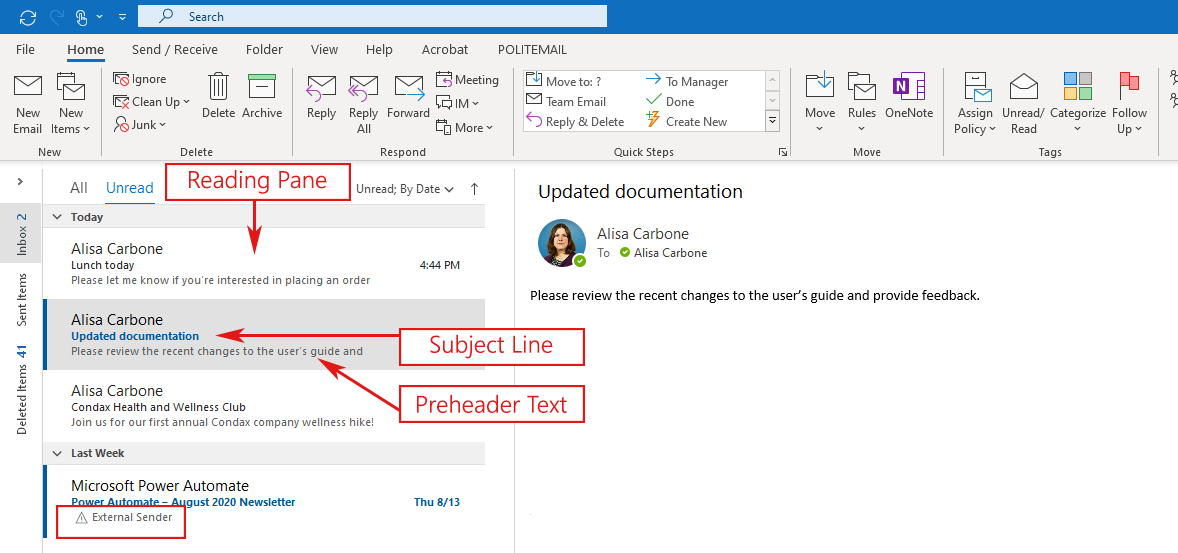
Outlook allows you to display up to 3 lines of preheader text. To change this setting, go to Outlook > View > Message Preview.
If you are using Amazon SES, the preheader text will display as a long URL unless you edit it beforehand.
Default Preheader Behavior
By default, PoliteMail will set any custom Preheader text you have created to be the displayed Preheader.
Tip: In general, the character limit for all the words to appear in the Outlook Reading Pane is 30 for the right side view and 120 for the Bottom view. This tends to be true regardless of screen resolution or whether being viewed on a monitor or mobile device.
If no custom Preheader text has been specified
Starting with version 5.4, a new setting has been created at User Preferences > Sending > Hide Preheader by Default.
- If this setting is set to FALSE (the default), the first email text found will be the Preheader, even if an Image is the first thing in the message. Otherwise the preheader will only contain a link to the image on Outlook for the Desktop.
- If this setting is set to TRUE, the Preheader will be blank.
If you are using the Beefree editor, this works with version 5.45 and later.
How to Edit Preheader Text
Preheader text will only be displayed based on the recipient's Outlook Message preview settings. PoliteMail measurement (tracking) must be turned on in order to display custom preheader text.
DESKTOP: With Measurement on, click the PoliteMail tab and you will see Edit Preheader text under the HTML options.
ONLINE: When composing a message, go to Send Options > Edit Preheader Text. Note that this feature was added to PoliteMail Online version 5.15 and higher.
You may enter up to three lines of Preheader text which will be displayed in the recipient's reading pane once they receive the message.
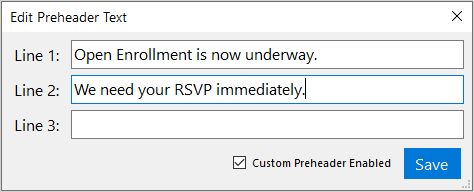
If you uncheck the "Custom Preheader Enabled" box, your message will be received with no preheader text. However, viewers will still be able to see the first line of the email.

